
主题
Vuex 状态管理
Vuex 是专为 Vue.js 应用程序开发的状态管理模式,核心概念包括 State、Mutation、Action、Getter 与 Module。
一、介绍
Vuex 是一个专为 Vue.js 应用程序开发的状态管理模式。
核心概念:State、Mutation、Action、Getter、Module。
注意:刷新页面会导致 state 重置,可以通过 state 是否被重置来判断浏览器是否刷新;也可以结合
localStorage实现永久存储。
二、安装
bash
npm install vuex@^3.4.0 --save实际安装的版本可以查看 yarn.lock(本次为 3.6.2)。
三、特点
- Vuex 的状态存储是响应式的。当 Vue 组件从 store 中读取状态时,若 store 中的状态发生变化,相应的组件也会高效地得到更新。
- 不能直接改变 store 中的状态。改变 store 中状态的唯一途径是显式地提交 mutation。
四、创建模块文件
创建 store 文件夹,并在其中创建各个模块文件。
1. index.js
js
import Vue from "vue";
import Vuex from "vuex";

import state from "./State.js";
import mutations from "./Mutations.js";
import actions from "./Actions.js";
import getters from "./Getters";

import themeColor from "./ThemeColor"; // module

Vue.use(Vuex);

const store = new Vuex.Store({
  state,
  mutations,
  actions,
  getters,
  modules: {
    themeColor,
  },
});

export default store;
2. State.js
js
const state = {
  count: 1,
  userName: "", // 用来判断页面是否刷新
  todoList: [
    {
      title: "TypeScript",
      status: false,
    },
    {
      title: "Nodejs",
      status: false,
    },
    {
      title: "Nginx",
      status: false,
    },
    {
      title: "uni-app",
      status: false,
    },
    {
      title: "跨域解决方案",
      status: true,
    },
    {
      title: "Vue性能提升",
      status: true,
    },
  ],
  imageUrl: "",
};

export default state;
3. Mutations.js
js
const mutations = {
  set_userName(state, payload) {
    state.userName = payload.data;
  },
  set_count(state, payload) {
    state.count = payload.data;
  },
  set_imageUrl(state, payload) {
    state.imageUrl = payload.data;
  },
  set_todoList(state, payload) {
    switch (payload.type) {
      case "add":
        state.todoList.unshift({
          title: payload.data,
          status: false,
        });
        break;
      case "edit":
        state.todoList.forEach((item, index) => {
          if (payload.index === index) {
            item.title = payload.data;
          }
        });
        break;
      case "delete":
        state.todoList.splice(payload.index, 1);
        break;
      default:
        break;
    }
  },
};

export default mutations;
4. Getters.js
实现 Vuex 数据持久化:先判断是否刷新了页面,如果 state 被重置就从 localStorage 中读取数据,否则直接取仓库中的值。
js
const getters = {
  /* Vuex 实现数据持久化 */
  user_name: (state) => {
    if (state.userName === "") {
      return localStorage.getItem("user_name");
    }
    return state.userName;
  },
};

export default getters;
5. Actions.js
js
const actions = {
  setCount({ commit }, payload) {
    return new Promise((resolve, reject) => {
      setTimeout(() => {
        commit("set_count", payload);
        resolve();
      }, 1000);
    });
  },
};

export default actions;
也可以在 actions 中获取接口数据,并把数据存到 Vuex 中:
js
async GET_STARS({ commit }) {
  const { data } = await axios.get('http://my-api/stars')
  commit('SET_STARS', data)
},
6. Module
在 store 文件夹下新建 ThemeColor 文件夹,专门存放系统颜色,并在其中新建 index.js、state.js、mutations.js。
js
// index.js
import state from "./state";
import mutations from "./mutations";

export default {
  namespaced: true, // 模块命名空间
  state,
  mutations,
};
js
// state.js
const state = {
  echartColor: "#333",
  fleetBg: "rgb(6,42,88)",
};

export default state;
js
// mutations.js
const mutations = {
  set_echartColor(state, payload) {
    state.echartColor = payload.data;
  },
  set_fleetBg(state, payload) {
    state.fleetBg = payload.data;
  },
};

export default mutations;
7. 注册到全局
js
// main.js
import store from "@/store/index.js";

new Vue({
  store, // 把 store 实例注入到所有的子组件中
  render: (h) => h(App),
}).$mount("#app");
五、辅助函数
当一个组件需要获取多个状态时,可以借助 mapState 辅助函数。为了提高复用性,把这些辅助函数写在混入中。
1. 根 store 的映射
js
// mixin.js
import { mapState, mapMutations, mapActions, mapGetters } from "vuex";

export const vuexRoot = {
  computed: {
    /* 把 this.count、this.userName 等映射为 this.$store.state.xxx */
    ...mapState(["count", "userName", "todoList", "imageUrl"]),
    /* 把 this.user_name 映射为 this.$store.getters.user_name */
    ...mapGetters([
      "user_name",
      // ...
    ]),
  },
  methods: {
    // 把 this.set_userName({ data: value }) 映射为
    // this.$store.commit('set_userName', { data: value })
    ...mapMutations(["set_userName", "set_imageUrl", "set_todoList"]),
    // 把 this.setCount(amount) 映射为
    // this.$store.dispatch('setCount', amount)
    ...mapActions(["setCount"]),
  },
};
2. 命名空间模块的映射
js
export const vuexThemeColor = {
  computed: {
    // 把 this.echartColor 映射为
    // this.$store.state.themeColor.echartColor
    ...mapState("themeColor", ["echartColor", "fleetBg"]),
  },
  methods: {
    // 把 this.set_echartColor({ data: value }) 映射为
    // this.$store.commit('themeColor/set_echartColor', { data: value })
    ...mapMutations("themeColor", ["set_echartColor", "set_fleetBg"]),
  },
};
六、在组件中使用
vue
<!-- a.vue:注册局部混入 -->
<script>
import { vuexRoot, vuexThemeColor } from "@/mixin";

export default {
  mixins: [vuexRoot, vuexThemeColor],
  mounted() {
    console.log(this.userName); // 取得 state 中的值
    console.log(this.user_name); // 取得 getter 中的值
    this.set_userName({ data: this.ruleForm.name }); // 调用 mutation 方法
    this.setCount({ data: 4 }).then(() => {
      // 调用 action 方法
      console.log(this.$store.state.count);
    });
  },
};
</script>
七、注意点
1. Mutation 需遵守 Vue 的响应规则
- 最好提前在 store 中初始化好所有的属性。
- 当需要在对象上添加新属性时,应该使用
Vue.set(obj, 'newProp', 122),否则新属性不具备响应式。 - Mutation 必须是同步函数:devtools 需要在 mutation 提交后立即记录状态快照,异步操作会让快照无法追溯,也就无法做时间旅行调试。
2. Action
- Action 提交的是 mutation,而不是直接变更状态。
- Action 可以包含任意异步操作。
3. dispatch 返回 Promise
this.$store.dispatch 的返回值是 Promise,所以后面可以接 .then(),在 action 执行结束后再执行后续动作。
八、组合 Action 的使用
1. 在组件里派发 action
js
this.$store.dispatch("actionA", value).then((res) => {
  // 派发其他的 action 或者写其他逻辑
});
2. 在 action 里派发另一个 action
js
const actions = {
  setCount({ commit }, value) {
    return new Promise((resolve, reject) => {
      setTimeout(() => {
        commit("set_count", value);
        console.log("3");
        resolve();
      }, 1000);
    });
  },

  actionA({ dispatch, commit }, value) {
    return dispatch("setCount").then(() => {
      commit("action_1", value);
      console.log("4");
    });
  },
};

export default actions;
3. 使用 async 与 await
js
const actions = {
  action({ commit }, value) {
    return new Promise((resolve, reject) => {
      setTimeout(() => {
        commit("action_1", value);
        console.log("4");
        resolve();
      }, 500);
    });
  },

  async actionB({ dispatch, commit }, value) {
    await dispatch("action", value + 1);
    commit("set_count", value);
  },
};

export default actions;
九、Module 命名空间
上面都是单一状态树,当状态比较大时可以模块化。
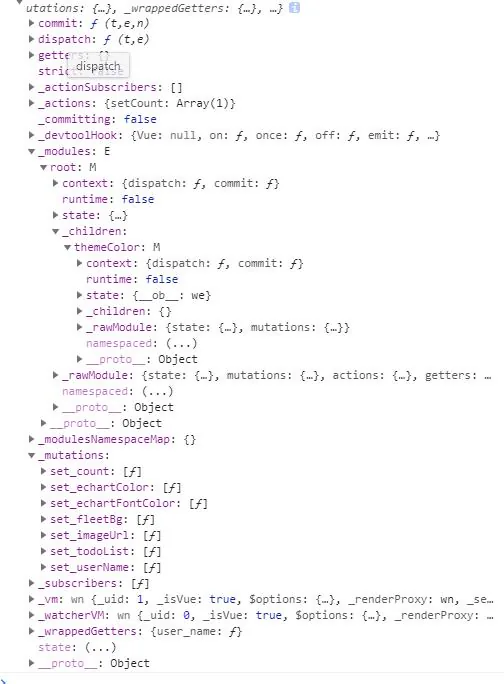
未开启命名空间(namespaced: false)
js
console.log(this.$store);modules 只有一个 root 根属性(全局属性),新增的 themeColor 模块挂在它的 children 下,mutations 中的方法 set_echartFontColor 也都放在 _mutations 中。
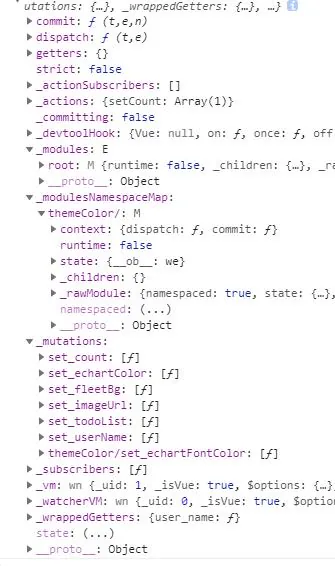
开启命名空间(namespaced: true)
_modulesNamespaceMap 中会登记该模块,mutations 中的方法 set_echartFontColor 在 _mutations 中自动加上 themeColor/ 前缀,从而与全局方法区分开来。
用函数声明模块状态
如果使用一个纯对象来声明模块的状态,那么这个状态对象会通过引用被共享,导致状态对象被修改时 store 或模块间的数据互相污染。
实际上这和 Vue 组件内的 data 是同样的问题,解决办法也是相同的——使用一个函数来声明模块状态(仅 2.3.0+ 支持):
js
const MyReusableModule = {
  state: () => ({
    foo: "bar",
  }),
  // mutation、action 和 getter 等等...
};